Zulip Chat Archive
Stream: general
Topic: Stenography and Lean 4
(deleted) (Aug 20 2025 at 17:03):
This is an offshoot of #mathlib4 > Switch to ↦ (\mapsto) globally
From what is said in the thread, there are some Lean users who use alternate keyboard layouts or custom systems to make it easier to type symbols. I would like to learn more about these systems so I can incorporate in my day to day Lean usage.
suhr (Aug 20 2025 at 17:42):
https://wiki.debian.org/XCompose
Some symbols for math
<Multi_key> <f> <i> : "∈"
<Multi_key> <f> <a> : "∀"
<Multi_key> <f> <e> : "∃"
<Multi_key> <f> <t> : "∧"
<Multi_key> <f> <v> : "∨"
<Multi_key> <f> <grave> : "¬"
<Multi_key> <f> <u> : "∪"
<Multi_key> <f> <n> : "∩"
<Multi_key> <f> <s> : "⊆"
<Multi_key> <f> <S> : "⊇"
<Multi_key> <f> <l> : "λ"
<Multi_key> <f> <bracketleft> : "⟨"
<Multi_key> <f> <bracketright> : "⟩"
<Multi_key> <f> <braceleft> : "←"
<Multi_key> <f> <braceright> : "→"
<Multi_key> <f> <slash> : "≠"
<Multi_key> <f> <less> : "≤"
<Multi_key> <f> <greater> : "≥"
<Multi_key> <colon> <colon> : "⋮"
<Multi_key> <f> <E> : "↔"
<Multi_key> <f> <backslash> : "↦"
<Multi_key> <f> <semicolon> : "←"
I also can type APL and BQN symbols in a similar way.
Arthur Paulino (Aug 20 2025 at 17:45):
I use a split keyboard and I've optimized my layout for programming in Lean and Rust: https://configure.zsa.io/moonlander/layouts/3oLLB/latest/0
If you check the MiscL layer, I have sequenced keys bound to :, = and >, which make it easier for me to type := and =>.
Similarly, on the MiscR layer, I have a setup for typing |>. fast. There are other sequenced keys that are easy, like <-, ->, != etc.
Also, note that I've made : easier to reach than ;.
(deleted) (Aug 20 2025 at 17:47):
Split keyboard... NKRO... Thumb keys... Maybe it's time for you to try Plover
Arthur Paulino (Aug 20 2025 at 17:50):
It's a beautiful bird, but I don't eat that kind of food :smiley_cat:
suhr (Aug 20 2025 at 17:57):
Huỳnh Trần Khanh said:
Maybe it's time for you to try Plover
Nah, I'm fine (I also use a split keyboard).
suhr (Aug 20 2025 at 17:58):
(still using qwerty though)
Violeta Hernández (Aug 20 2025 at 17:58):
I have a bunch of pseudo-Latex macros like !in; and !sqrt; which I use to type Unicode on the day to day
Aaron Liu (Aug 20 2025 at 17:58):
I just have a normal keyboard
Arthur Paulino (Aug 20 2025 at 18:01):
I used normal keyboards for 25+ years. But now I'm trying to fix my posture. The shoulders feel much better now
suhr (Aug 20 2025 at 18:03):
I don't care about posture, \\\\ stagger is just awkward for the left hand.
suhr (Aug 20 2025 at 18:04):
And uneven stagger is a bit awkward for the right hand too.
Aaron Liu (Aug 20 2025 at 18:05):
suhr said:
I don't care about posture, \\\\ stagger is just awkward for the left hand.
I have no idea what this means
suhr (Aug 20 2025 at 18:06):

Notice that the columns form the \\\\ shape.
suhr (Aug 20 2025 at 18:08):
That's nice for the right hand, but not so nice for the left hand. Because for the left hand you would like //// instead.
Aaron Liu (Aug 20 2025 at 18:09):
oh good point yeah that's a little stressful on the left hand
Aaron Liu (Aug 20 2025 at 18:10):
how do I fix my keyboard
(deleted) (Aug 20 2025 at 18:11):
There are cursed keycaps out there that turn staggered keyboards into ortholinear keyboards...
suhr (Aug 20 2025 at 18:11):
By getting one which does not have this problem. Columnar split keyboard is a popular option.
(deleted) (Aug 20 2025 at 18:11):
This keyboard is very good https://shop.chenonetta.com/product/jarne-the-ultimate-keyboard/
(deleted) (Aug 20 2025 at 18:12):
It takes a century to get one though because these keyboards are made by hand
suhr (Aug 20 2025 at 18:12):
There are also various kinds of symmetric keyboards, like katana, x-bows, etc.
Aaron Liu (Aug 20 2025 at 18:12):
Huỳnh Trần Khanh said:
This keyboard is very good https://shop.chenonetta.com/product/jarne-the-ultimate-keyboard/
it doesn't have a numpad
suhr (Aug 20 2025 at 18:13):
Yeah, it does not have enough key overall.
Aaron Liu (Aug 20 2025 at 18:13):
I want all the keys
Aaron Liu (Aug 20 2025 at 18:14):
still sad my own keyboard doesn't have F13-F24
Arthur Paulino (Aug 20 2025 at 18:14):
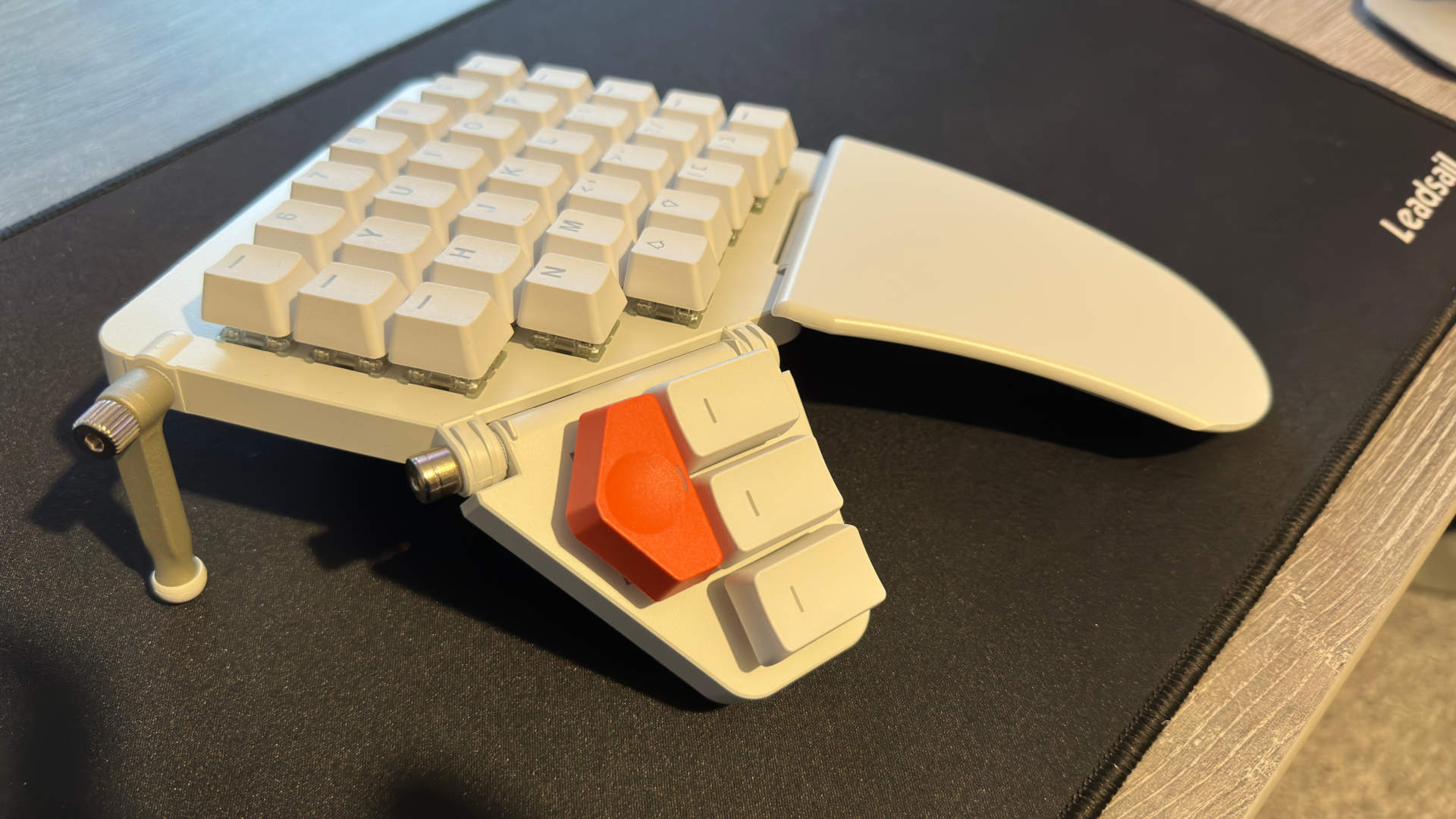
Right, that's why I bought a split keyboard with ortholinear parts. This way you can tilt both parts accordingly.
The parts also spin slightly on the axis that follow the forearm so you don't end up twisting your arm with the thumbs downwards and the small fingers upwards to type on a flat surface. The difference is HUGE.
suhr (Aug 20 2025 at 18:30):
Huỳnh Trần Khanh said:
There are cursed keycaps out there that turn staggered keyboards into ortholinear keyboards...
Unlike the standard keyboard, which is awkward for the left hand, ortholinear (square grid) keyboards are awkward for both hands. Unless you split it in two halves and put them far apart.
Thomas Murrills (Aug 20 2025 at 18:38):
Iirc, it’s probably worth mentioning in this thread the difference between ortholinear keyboards and columnar keyboards (where the columns are staggered to match finger length differences). The keyboard in @Arthur Paulino’s message (the ZSA moonlander, perhaps?) looks to me to have slightly staggered columns instead of being a true ortholinear!
Thomas Murrills (Aug 20 2025 at 18:41):
(Aside: I’ve heard good things about the Moonlander! If I had the desk setup to accommodate it, I’d seriously consider investing in one…)
Arthur Paulino (Aug 20 2025 at 18:42):
Hm, my keys are ortholinear (they truly follow the shape of the fingers), but they don't form a grid! They keys for the middle columns go a bit further away. This is another detail that improves the adjustment for my hands.
Arthur Paulino (Aug 20 2025 at 18:44):
I'm not getting any money from this. I'm just being honest about my experience :sweat_smile:
I wish the best for anyone who spends several hours everyday on a computer, like I do.
Thomas Murrills (Aug 20 2025 at 19:18):
Oh, I was under the impression “ortholinear” specifically meant having the keys arranged on a square grid (i.e. “along perpendicular lines”), while “columnar” referred to the arrangement you see there, where each finger’s keys are in a column, and the columns are staggered!
Arthur Paulino (Aug 20 2025 at 19:31):
The definitions seem to vary across different sources, but you got the idea
Patrick Massot (Aug 21 2025 at 02:41):
Aaron Liu said:
I want all the keys
This is a mistake. The maximum number of keys that you can have in a comfortable keyboard is 42 (six keys for index and pinky fingers, three keys for the other fingers). Above that number there are keys that are more than one key away from your rest position. I don’t have any keyboard with more than 36 keys (only three keys per pinky finger), but some people like 42 keys. Then of course I have many layers which give me access to many more symbols and macros than what you get on a non-configured 105 keys keyboard. And Leo de Moura also uses such keyboards, so the discussion is settled anyway.
Patrick Massot (Aug 21 2025 at 02:42):
Fun coincidence: I just gave a talk about Lean to high school students in Hangzhou and all questions after the talk were about my keyboard (a chocofi keyboard in this case).
Patrick Massot (Aug 21 2025 at 02:42):
That being written, this conversation is really getting off-topic and we should stop it.
Gavin Zhao (Aug 22 2025 at 22:26):
*sad Vim digraph user noises
suhr (Aug 22 2025 at 23:05):
Patrick Massot said:
The maximum number of keys that you can have in a comfortable keyboard is 42 (six keys for index and pinky fingers, three keys for the other fingers).
I can easily reach all 60 keys on my keyboard (ergohaven k03). Even though my hands are not that big. And I think one could easily reach even more keys on glove80 due to keyboard being curved.
Aaron Liu (Aug 22 2025 at 23:11):
I can move my hands around to reach more keys on my keyboard
Michael Rothgang (Aug 23 2025 at 05:32):
comfortable is the load-bearing word above. Of course you can reach more keys; the question is how easy/efficient this is (or perhaps, if working with a smaller keyboard and more layers would actually be better).
Michael Rothgang (Aug 23 2025 at 05:32):
FWIW, I suspect the answer is yes, but am still using a default keyboard layout (QWERTZU)
JJ (Aug 24 2025 at 21:12):
I find much success in using XCompose like @suhr. It works mostly everywhere, though differences in behavior across GTK / Qt / SDL and failure to work in libadwaita is sometimes annoying. GTK gives you a preview of what you're typing and lets you cancel and delete it, which is very very nice, especially since Firefox / Chrome / VSCode / etc are GTK-based.
(Also, despite the name, XCompose works fine on KDE + Wayland -- probably GNOME, too)
I found it useful to copy the Lean keybindings out of the VSCode extension as a base. I transformed those into the XCompose syntax. Since then I've added a bunch of random bindings for various symbols I need for linguistics etc, and changed some symbols to better align with how I first think to type them...
If anyone is so interested I've attached a modified version of my XCompose here (with some raw key remappings excluded). XCompose
Last updated: Feb 28 2026 at 14:05 UTC